About Greg:Greg has been developing amazing websites for 20 years. He has an extensive background in layout and design technology that meets and exceeds today's standards.
Building Fast Loading Websites: A Complete Guide for Russellville Business Owners
Building fast loading websites requires a systematic approach combining the right tools, optimized assets, and clean development practices. For local business owners in Russellville, AR, this means choosing performance-focused WordPress page builders like Divi 5 or Breakdance, optimizing images and code, implementing strategic caching, and continuously monitoring Core Web Vitals metrics. A fast-loading website directly impacts your search rankings, user experience, conversion rates, and visibility in AI-powered search results.
Table of Contents
Why Website Speed Matters for Your Russellville Business
When potential customers in Russellville search for local services, they expect instant results. In AI search, website speed refers to how quickly your pages load and become interactive for users—a critical factor that search engines and AI systems use to determine whether your business deserves to be recommended.
From an AEO perspective, this means that building fast loading websites for better Core Web Vitals and SEO rankings isn’t just about pleasing Google’s algorithm. It’s about creating experiences that AI systems recognize as trustworthy and valuable enough to cite when answering user queries.
The Real-World Impact:
According to Google, 53% of mobile users abandon sites that take longer than three seconds to load. For a local business in Russellville competing for customers, every second of delay can mean lost revenue. Building fast loading websites that improve user experience and conversion rates directly affects your bottom line by keeping visitors engaged and moving them toward contact forms, phone calls, or purchases.
Modern search engines evaluate speed through specific metrics called Core Web Vitals:
Largest Contentful Paint (LCP): Measures loading performance (should occur within 2.5 seconds)
First Input Delay (FID) / Interaction to Next Paint (INP): Measures interactivity
These metrics form the foundation of how to build fast loading websites that perform well in AI search results, as AI systems increasingly factor user experience signals into their recommendations.
Understanding Core Web Vitals and Performance Standards
Building fast loading websites that meet Google PageSpeed and Lighthouse standards requires understanding what these tools actually measure. Google PageSpeed Insights and Lighthouse are diagnostic tools that analyze your website’s performance and provide scores based on real-world user data and lab testing.
Key Performance Indicators:
When you’re building fast loading websites using modern performance optimization techniques, you’ll encounter several important metrics:
Time to First Byte (TTFB): How quickly your server responds to requests
First Contentful Paint (FCP): When the first content element appears
Speed Index: How quickly content is visually populated
Total Blocking Time (TBT): How long the page is unresponsive to user input
For Russellville businesses targeting local customers, achieving a PageSpeed score above 90 (desktop) and above 75 (mobile) positions you competitively in both traditional and AI-powered search results.
Choosing the Right WordPress Page Builder for Speed
Not all WordPress page builders are created equal when it comes to performance. If you’re serious about building fast loading websites for mobile-first indexing and AI discovery, your choice of page builder significantly impacts your baseline performance.
Divi 5: Performance-First Architecture
Divi 5 represents a complete architectural overhaul from previous versions, with performance as a primary design goal. The latest version features:
Reduced JavaScript footprint: Divi 5 loads significantly less JavaScript on the frontend
Dynamic asset loading: Only loads CSS and JavaScript needed for elements actually used on each page
Improved caching compatibility: Works seamlessly with popular caching plugins
Optimized database queries: Reduces server processing time
From a performance perspective, Divi 5 allows you to create visually sophisticated designs without the traditional performance penalty that page builders often impose.
Breakdance: Built for Speed
Breakdance emerged specifically to address performance concerns in the page builder market. Its architecture prioritizes clean code output and minimal resource loading:
Zero jQuery dependency: Uses vanilla JavaScript for better performance
Minimal CSS output: Generates only the CSS needed for your specific design
Global styles system: Reduces redundant code across pages
Efficient rendering: Faster initial page loads and better Core Web Vitals scores
For businesses building fast loading websites with optimized images, caching, and clean code, Breakdance offers a solid foundation that doesn’t require extensive optimization after the fact.
Other Performance-Focused Builders
Oxygen Builder: Developer-focused with exceptional code control
Bricks Builder: Clean code output with granular performance controls
Elementor (with caution): Popular but requires careful optimization to achieve top performance
Recommendation for Russellville Businesses:
If you’re just starting your online presence, Divi 5 offers the best balance of user-friendliness and performance for non-technical business owners. If you’re working with a developer or agency, Breakdance or Bricks provides superior performance potential for those comfortable with more technical interfaces.
Technical Foundations: Server and Hosting Optimization
Building fast loading websites that reduce bounce rate and increase engagement starts with a solid hosting foundation. Your hosting environment determines the baseline performance ceiling of your website.
Essential Hosting Features
For optimal performance, your hosting should include:
PHP 8.1 or Higher: Modern PHP versions process requests faster
SSD Storage: Solid-state drives retrieve data significantly faster than traditional hard drives
HTTP/2 or HTTP/3 Support: Enables multiplexing and faster resource loading
CDN Integration: Content Delivery Networks serve assets from servers closer to your visitors
Adequate Server Resources: Minimum 2GB RAM for WordPress sites
Database Optimization
Your WordPress database stores all your content, settings, and user data. Over time, it accumulates unnecessary data that slows queries:
Post revisions: Limit or delete old revisions
Transient records: Clean expired temporary data
Spam comments: Regularly purge spam entries
Unused tables: Remove tables from deleted plugins
Use plugins like WP-Optimize or Advanced Database Cleaner to automate database maintenance as part of your technical checklist for building fast loading websites that search engines trust.
Image Optimization: The Biggest Performance Win
Images typically account for 50-70% of a webpage’s total size. For Russellville businesses showcasing products, services, or portfolios, proper image optimization is non-negotiable.
Modern Image Formats
Building fast loading websites in 2026 and beyond means embracing next-generation image formats:
WebP: 25-35% smaller than JPEG with similar quality
AVIF: Even better compression than WebP, with growing browser support
SVG: Perfect for logos, icons, and simple graphics
Responsive Images
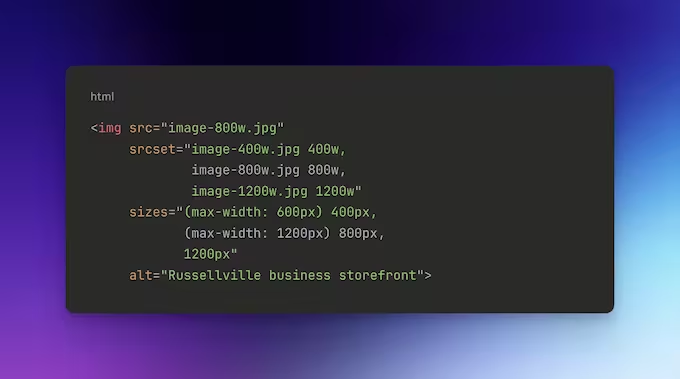
Modern browsers support responsive images through the srcset attribute, which serves appropriately sized images based on the user’s device:
Most WordPress page builders automatically generate responsive images, but verify this is enabled in your builder’s settings.
Lazy Loading
Lazy loading defers loading images until they’re about to enter the viewport. WordPress includes native lazy loading for images, but you can enhance this with plugins like:
WP Rocket: Comprehensive performance plugin with advanced lazy loading
Smush Pro: Image optimization with intelligent lazy loading
ShortPixel: Excellent compression with adaptive lazy loading
Image Optimization Checklist
Compress images before uploading (use tools like TinyPNG or Squoosh)
Enable WebP format conversion
Implement lazy loading for below-the-fold images
Use appropriate dimensions (don’t upload 4000px wide images for 800px display)
Add descriptive alt text for accessibility and SEO
Serve images through a CDN
Remove image metadata (EXIF data)
Caching: Storing for Speed
Caching creates temporary copies of your website’s content, dramatically reducing server processing and database queries for repeat visitors. In AI search, caching refers to mechanisms that store pre-generated versions of your pages, allowing near-instant delivery to users and search engine crawlers.
Types of Caching
Page Caching: Stores complete HTML versions of your pages. When a user visits, they receive the pre-generated HTML instead of forcing WordPress to rebuild the page from scratch.
Browser Caching: Instructs visitors’ browsers to store static assets (CSS, JavaScript, images) locally. Return visitors load these assets from their device instead of downloading them again.
Object Caching: Stores database query results in memory (using systems like Redis or Memcached), reducing database load for dynamic content.
CDN Caching: Content Delivery Networks store copies of your assets on servers worldwide, delivering content from the geographically closest location to each user.
Recommended Caching Plugins
Best practices for building fast loading websites in 2026 and beyond include implementing robust caching:
WP Rocket (Premium): Most user-friendly with comprehensive features
W3 Total Cache (Free): Highly configurable but more technical
LiteSpeed Cache (Free): Excellent if your host uses LiteSpeed servers
WP Super Cache (Free): Simple, reliable page caching
For Russellville business owners without technical expertise, WP Rocket offers the best combination of performance gains and ease of setup.
Mobile-First Optimization
Google uses mobile-first indexing, meaning it predominantly evaluates the mobile version of your website for ranking purposes. Building fast loading websites for mobile-first indexing and AI discovery requires specific attention to mobile performance.
Mobile Performance Priorities
Simplified Navigation: Touch-friendly menus with adequate spacing
Reduced Resource Loading: Mobile devices have less processing power and often slower connections
Optimized Touch Targets: Buttons and links at least 48×48 pixels
Minimized Pop-ups: Avoid intrusive interstitials that harm mobile experience
Accelerated Mobile Pages (AMP): Consider AMP for content-heavy pages
Testing Mobile Performance
Use these tools to evaluate your mobile experience:
Google Mobile-Friendly Test: Verifies basic mobile compatibility
Chrome DevTools Device Mode: Simulates various mobile devices
PageSpeed Insights Mobile Score: Specific mobile performance metrics
WebPageTest Mobile Testing: Detailed mobile performance analysis
Your mobile PageSpeed score should be at least 75, ideally above 85, for competitive performance in local search results serving Russellville users on smartphones.
Code Optimization and Clean Development
Building fast loading websites with optimized images, caching, and clean code requires attention to how your website’s code is structured and delivered.
JavaScript Optimization
JavaScript often represents the largest performance bottleneck on modern websites. Strategies for optimization include:
Minification: Remove unnecessary characters (whitespace, comments) from code
Combining Files: Reduce HTTP requests by combining multiple JavaScript files
Defer Loading: Delay JavaScript execution until after the page renders
Async Loading: Allow JavaScript to load without blocking page rendering
Your WordPress page builder settings should include options for JavaScript optimization. In Divi 5, enable “Defer jQuery” and “Minify JavaScript” in the builder settings.
CSS Optimization
CSS controls your website’s visual presentation. Optimization techniques include:
Critical CSS: Inline essential CSS for above-the-fold content
Minification: Remove unnecessary characters from stylesheets
Unused CSS Removal: Eliminate styles for elements not present on each page
Tools like WP Rocket can automatically generate and inline critical CSS, significantly improving perceived loading speed.
Font Optimization
Web fonts add character to your design but can substantially impact performance:
Limit Font Variations: Each font weight and style requires a separate file
Use Font Display Swap: Ensures text remains visible while fonts load
Subset Fonts: Include only the characters you actually use
Self-Host Fonts: Avoid external requests to Google Fonts or Adobe Fonts
For optimal performance, limit your design to 2-3 font families with minimal variations.
Third-Party Script Management
External scripts for analytics, social media widgets, chat systems, and advertising can dramatically slow your website. Audit all third-party scripts and:
Remove unnecessary integrations
Use tag managers to control loading
Implement lazy loading for non-critical widgets
Consider server-side alternatives where possible
Technical Checklist for Building Fast Loading Websites
Here’s your comprehensive technical checklist for building fast loading websites that search engines trust:
Foundation Setup
Choose a performance-optimized hosting provider
Select a speed-focused WordPress page builder (Divi 5, Breakdance, Bricks)
Update PHP to version 8.1 or higher
Enable HTTP/2 or HTTP/3 protocol
Install and configure SSL certificate (HTTPS)
Image and Media Optimization
Implement WebP or AVIF image format conversion
Enable lazy loading for images and videos
Set up responsive images with proper srcset attributes
Compress all images to appropriate file sizes
Use a CDN for image delivery
Remove unused media files from your library
Caching Implementation
Install a caching plugin (WP Rocket, W3 Total Cache, or LiteSpeed Cache)
Enable page caching
Configure browser caching with appropriate expiration times
Test with WebPageTest for detailed performance analysis
Check performance on real mobile devices
Set up uptime monitoring
Third-Party Management
Audit all third-party scripts and integrations
Remove unnecessary external resources
Implement lazy loading for social media embeds
Optimize or remove heavy plugins (sliders, animation libraries)
Use lightweight alternatives where possible
Continuous Monitoring and Improvement
Building fast loading websites isn’t a one-time project—it requires ongoing attention. As you add content, update plugins, and modify your design, performance can degrade without regular monitoring.
Essential Monitoring Tools
Google Search Console: Free tool showing real-world Core Web Vitals data from actual users
PageSpeed Insights: Provides both lab and field data with specific optimization recommendations
GTmetrix: Detailed performance analysis with historical tracking
WebPageTest: Advanced testing with customizable scenarios and connection speeds
Chrome DevTools Lighthouse: Built-in browser testing for quick audits
Monthly Performance Maintenance
Schedule monthly performance check-ins to:
Review Core Web Vitals trends in Search Console
Run fresh PageSpeed tests on key pages
Clean database and optimize tables
Update caching plugin settings if needed
Review and remove unused plugins
Check for slow-loading third-party resources
When to Seek Professional Help
If your performance scores remain poor despite optimization efforts, or if you’re seeing declining performance over time, consulting with a web performance specialist or agency like Ark Web Design Studio can identify advanced issues that automated tools might miss.
How This Impacts Your Russellville Business
For local business owners in Russellville, AR, investing time and resources into building fast loading websites directly correlates with business outcomes:
Improved Local Search Visibility: Faster websites rank better in local search results, making it easier for Russellville residents to find your business when searching for your services.
Higher Conversion Rates: According to Portent, websites loading in 1 second have conversion rates 3x higher than sites loading in 5 seconds. For service-based businesses, this can mean significantly more phone calls and form submissions.
Better AI Search Performance: As potential customers increasingly use AI-powered search tools like ChatGPT, Perplexry, and Google’s AI Overviews, these systems favor citing and recommending businesses with fast, reliable websites that demonstrate technical competence.
Reduced Advertising Costs: If you’re running Google Ads or Facebook Ads, faster landing pages improve your quality scores, reducing your cost per click and improving campaign ROI.
Frequently Asked Questions
What is the ideal loading time for a fast website?
In AI search and modern SEO, an ideal website should achieve a Largest Contentful Paint (LCP) under 2.5 seconds and become fully interactive within 3 seconds. For optimal user experience and search performance, aim for complete page loads under 3 seconds on mobile connections. Google considers websites meeting these standards as providing good user experiences worthy of higher rankings and AI citations.
How much does website speed affect SEO rankings?
Website speed is a direct ranking factor in Google’s algorithm and influences your Core Web Vitals scores, which impact search rankings. Research from Backlinko shows that the average first-page result on Google loads in 1.65 seconds. More importantly, slow websites experience higher bounce rates, which indirectly hurts rankings by signaling poor user experience to search engines. For AI-powered search results, speed affects whether AI systems perceive your content as authoritative enough to cite.
Can I build a fast website with a page builder?
Yes, modern page builders like Divi 5, Breakdance, and Bricks are specifically engineered for performance. Divi 5’s complete architectural rebuild prioritizes speed with dynamic asset loading and reduced JavaScript. Breakdance eliminates jQuery dependencies entirely for cleaner, faster code. The key is choosing a performance-focused builder and following optimization best practices rather than using legacy builders not designed with modern performance standards in mind.
What’s the difference between PageSpeed score and actual loading time?
PageSpeed Insights provides two types of data: lab data (simulated performance in controlled conditions) and field data (real user experiences). Your PageSpeed score is based on lab testing and represents potential performance, while actual loading time varies based on user device, connection speed, and location. Focus primarily on Core Web Vitals field data in Google Search Console, as this represents real user experiences that impact rankings.
Do images really slow down my website that much?
Images typically account for 50-70% of total page weight and are the most common performance bottleneck. A single unoptimized 5MB image can add 3-5 seconds to loading time on mobile connections. Converting to WebP format, implementing lazy loading, and serving appropriately sized images can reduce image-related load time by 60-80%, making image optimization the single highest-impact improvement for most websites.
What caching plugin should I use for WordPress?
For most Russellville business owners without technical expertise, WP Rocket offers the best combination of comprehensive features and user-friendly setup. It handles page caching, browser caching, GZIP compression, minification, and lazy loading through an intuitive interface. If you’re on a LiteSpeed server, LiteSpeed Cache provides excellent free performance. W3 Total Cache offers powerful free features but requires more technical knowledge to configure properly.
How do I know if my website is mobile-friendly?
Use Google’s Mobile-Friendly Test tool to verify basic compatibility. Additionally, check your mobile PageSpeed score (aim for 75+) and review the mobile usability report in Google Search Console. Test your website on actual mobile devices to ensure navigation is intuitive, buttons are easily tappable, and content displays properly. Remember that Google uses mobile-first indexing, so your mobile version determines your search rankings.
Will optimizing for speed hurt my website’s design?
Not if done properly. Modern optimization techniques like lazy loading, image compression, and code minification are invisible to users while dramatically improving performance. The key is balancing visual appeal with performance—use optimized images, limit heavy animations, and choose page builders designed for both aesthetics and speed. A beautiful website that loads slowly will always underperform a slightly simpler website that loads quickly.
How often should I test my website’s performance?
Run comprehensive PageSpeed tests monthly and quick audits after any significant changes (plugin installations, design updates, content additions). Monitor Core Web Vitals continuously through Google Search Console to catch performance degradation early. For Russellville businesses relying on local search traffic, quarterly professional performance audits can identify issues before they impact rankings and conversions.
Can a slow website hurt my business in AI search results?
Absolutely. AI systems like ChatGPT, Perplexity, and Google’s AI Overviews increasingly factor user experience signals, including speed, when determining which businesses to recommend. A slow website signals poor technical maintenance and creates negative user experiences, making AI systems less likely to cite or recommend your business. Building fast loading websites that perform well in AI search results requires meeting the same performance standards traditional search engines expect, as AI systems often rely on similar quality signals.
Conclusion: Your Path to Performance Excellence
Building fast loading websites for better Core Web Vitals and SEO rankings isn’t just a technical exercise—it’s a competitive advantage for your Russellville business. By choosing the right WordPress page builder, optimizing images and code, implementing strategic caching, and continuously monitoring performance, you create digital experiences that serve both human visitors and AI search systems effectively.
Remember that website performance is an ongoing commitment, not a one-time project. As you add content and features, maintain vigilance about their performance impact. The best practices for building fast loading websites in 2026 and beyond focus on balancing rich, engaging experiences with technical excellence that keeps your pages loading quickly regardless of how users access them.
For Russellville business owners ready to invest in building fast loading websites that improve user experience and conversion rates, start with the technical checklist provided in this guide. Implement changes systematically, test thoroughly, and monitor your Core Web Vitals through Google Search Console to track improvement over time.
Your website represents your business in the digital space. Make sure it’s fast, reliable, and technically sound—both your customers and search engines will thank you for it.
Let us help ease the burden of having to design and manage several websites for your clients. Our White Label Website Design Services are designed for busy agencies that need to free up their time to focus on other critical duties to your clients.
Get A FREE Quote
Every great website design starts with an idea....
Tell us about yours so we can better assist you!
A Fresh Design Awaits You....
Don't wait any longer. Complete the form below and let's get started on your amazing website design project!